Audio Override Settings
The Audio Override Settings is a component responsible for applying the player volume settings.
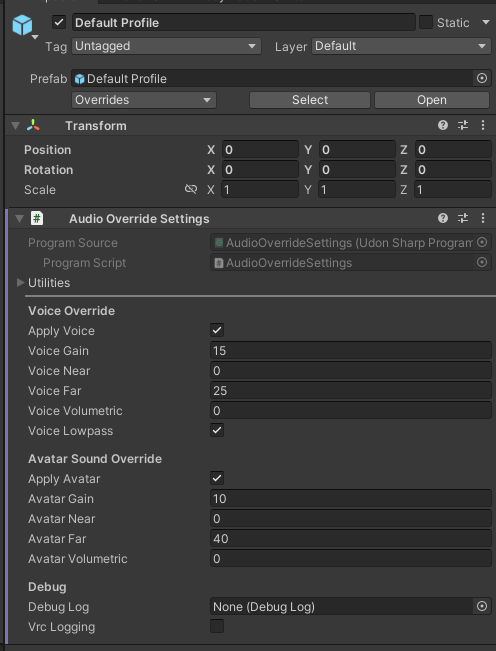
Configuration
Voice Override

The settings for player voice audio.
Apply Voice
Whether to apply the voice override settings
Voice Gain
Voice volume.
Default is 15, which is normal volume level. 0 is used for Broadcast and Mute profiles.
Voice Near
How close the player can be heared.
Default is 0, meaning no distance is required for hearing other players. For the broadcast profile, this defaults to 200.
Voice Far
How far the player can be heared from.
Default is 25, meaning 25 units/meters is the furthest distance you can hear other players from. For the broadcast profile, this defaults to 200. So also for a comms system, you want to set this very high, so you can hear over large distances. For muting players, set this to 0 and set the near to 0 as well, meaning there's no space to hear the other players.
Voice Volumetric
The volumetric radius for the player's voice.
Default is 0. For the broadcast profile, this defaults to 200.
Voice Lowpass
Whether a lowpass filter is applied to the player's voice.
Default is On. For the broadcast profile, this defaults to Off.
Avatar Sound Override

The settings for avatar sounds.
Apply Avatar
Whether to apply the overrides to the avatar sounds.
Avatar Gain
Avatar volume.
Default is 10, which is normal volume level. 0 is used for Broadcast and Mute profiles.
Avatar Near
How close the avatar sounds can be heared.
Default is 0, meaning no distance is required for hearing other players. For the broadcast profile, this defaults to 200.
Avatar Far
How far the avatar sounds can be heared from.
Default is 40, meaning 40 units/meters is the furthest distance you can hear avatar sounds from. For the broadcast profile, this defaults to 200. For muting avatar sounds, set this to 0 and set the near to 0 as well, meaning there's no space to hear the avatar sounds.
Avatar Volumetric
The volumetric radius for the avatar sounds.
Default is 0. For the broadcast profile, this defaults to 200.
Debug Options

Debug Log
The debug log object that any logging should be directed to.
VRC Logging
Writes a copy of any logged messages to the VRChat log.
Public API
Network Sync
This object is not network synced.
Inherited API
- UdonSharpBehaviour Public API
Properties
bool applyVoice
Determines whether voice override settings should be applied.
float voiceGain
Gets or sets the gain (volume) level for voice.
float voiceNear
Gets or sets the near distance for voice attenuation.
float voiceFar
Gets or sets the far distance for voice attenuation.
float voiceVolumetric
Gets or sets the volumetric radius for voice.
bool voiceLowpass
Gets or sets whether a lowpass filter is applied to voice.
bool applyAvatar
Determines whether avatar audio override settings should be applied.
float avatarGain
Gets or sets the gain (volume) level for avatar audio.
float avatarNear
Gets or sets the near distance for avatar audio attenuation.
float avatarFar
Gets or sets the far distance for avatar audio attenuation.
float avatarVolumetric
Gets or sets the volumetric radius for avatar audio.
DebugLog debugLog
Gets or sets the debug logging interface used by this class.
bool vrcLogging
Gets or sets whether VRChat-specific logging is enabled.
Methods
void _Apply( VRCPlayerApi player )
Applies voice and avatar override settings to the specified VRCPlayerApi player.