Audio Override Zone
The Audio Override Zone is a component responsible for setting zones based settings. For example usable to make soundproof area's or to make a comms system between area's.
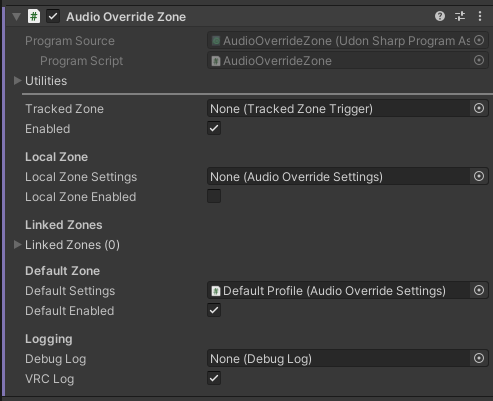
Configuration
Tracked Zone
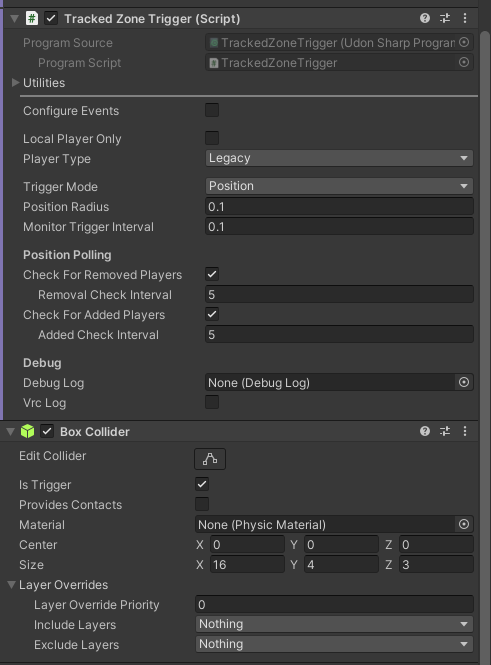
Zone trigger that defines volume of this override zone. It can be set to a Tracker Zone Trigger component that is attached to this same object as long as it has an associated trigger collider.
Should be left empty if this is the Default zone.
Example tracked zone trigger settings:
Enabled
Whether the zone as a whole is active and used in audio calculations.
Local Zone

Local zone is used to tell the Audio Override Manager what to do when players are in this zone.
Local Zone Settings
An audio profile that will be applied against players standing in the same zone as the local player. Empty by default, which will use the default VRChat proximity chat settings.
Local Zone Enabled
Whether the local settings profile should currently be used or not.
If disabled, zone will defer to the default profile instead.
Linked Zones
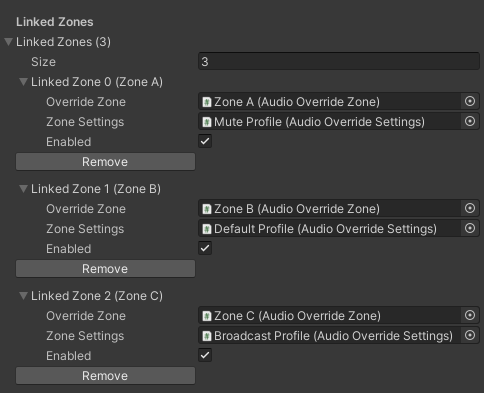
Linked Zones are used to tell the Audio Override Manager which Audio Override Settings to use for players in other zones.
Override Zone
An Audio Override Zone that gets affected inside our zone.
Basically when a player is in OUR zone, this specifies what happens to to the audio of the players in the remote override zone.
Zone settings
An audio profile that should be applied to the players standing in the remote override zone.
Basically when a player is standing in the remote override zone, what audio profile should get applied to their voice, for the players in our zone to hear.
Enabled
Whether the link between zones should currently be used or not.
If disabled, zone will defer to the default profile instead.
Default Zone

Default zone is used to tell the Audio Override Manager which Audio Override Settings to use for any player that does not match any of the zones specified.
Default Settings
An audio profile that will be applied against any players that were not affected by the local zone or the linked zone profiles.
Basically a fallback audio profile for those in locations not matched to our links and locals.
Default Enabled
Whether the default settings profile should currently be used or not.
If disabled, zone will defer to the system-wide default profile instead.
Debug Options

Debug Log
The debug log object that any logging should be directed to.
VRC Logging
Writes a copy of any logged messages to the VRChat log.
Example setup
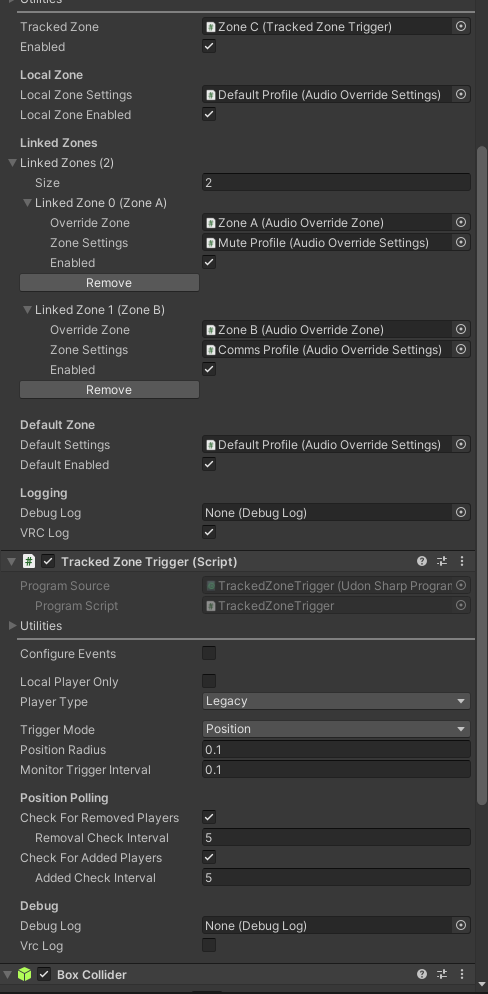
In the following example, you're looking at Zone C, which is on the Stage in this world. It has a Zone component, a Tracked Zone Trigger and a Box Collider covering the whole stage space.
The local zone settings are set so that all the players on stage (performers) can hear eachother at the Default audio volume settings.
Linked to this zone is Zone A, which is the greenroom, located behind our stage. The linked zone settings for Zone A is set to Mute, meaning all players in the greenroom are muted for the performers on stage. This way players in the greenroom can talk as much as they want and as loud as they want, without distracting the performers.
Also linked to this zone is Zone B, which is the Front Of House zone. The linked zone settings for Zone B is set to Comms, which is a custom profile similar to broadcast, but without gaining the volume. This means for example that the audio engineer can have talkback to the performers (for example a band).
And then the default zone settings is set that for anyone outside of those two zones, they'll be heared at the default volume levels, like when you're not using PlayerAudioTXL.
Public API
Network Sync
This object is not network synced.
Inherited API
- UdonSharpBehaviour Public API
Properties
ZoneTrigger zone
Returns the current
ZoneTriggerassociated with this manager.
TrackedZoneTrigger trackedZone
Gets the
TrackedZoneTriggerused for tracking zone membership.
bool zoneEnabled
Indicates whether the zone is enabled.
AudioOverrideSettings localZoneSettings
Gets or sets the audio override settings specific to the local zone.
bool localZoneEnabled
Indicates whether local zone settings are active.
AudioOverrideZone[] linkedZones
Gets the array of linked zones used for additional audio configurations.
AudioOverrideSettings[] linkedZoneSettings
Gets the settings corresponding to each linked zone.
bool[] linkedZoneEnabled
Gets the array of flags indicating whether each linked zone is enabled.
AudioOverrideSettings defaultSettings
Gets or sets the default audio settings when no zone override is active.
bool defaultEnabled
Indicates whether default settings are enabled.
DebugLog debugLog
Access to the debug logging interface.
bool vrcLogging
Enables or disables VRChat-specific logging.
Methods
void _Register( AudioOverrideManager overrideManager, int zoneId )
Binds this zone to an override manager with a specified zone ID.
int _ZoneId()
Gets the unique identifier for this managed zone.
void _SetZoneEnabled( bool state )
Enables or disables this zone. No change occurs if the requested state matches the current state.
void _SetLocalActive( bool state )
Enables or disables the local zone audio override profile for this zone. No change occurs if the requested state matches the current state.
AudioOverrideSettings _GetLocalSettings()
Gets the local zone audio override profile settings for this zone.
void _SetLocalSettings( AudioOverrideSettings profile )
Sets the local zone audio override profile settings. No update occurs if the new profile is identical to the current one.
void _SetDefaultActive( bool state )
Enables or disables the default zone audio override profile for this zone. No change occurs if the requested state matches the current state.
AudioOverrideSettings _GetDefaultSettings()
Gets the default zone audio override profile settings for this zone.
void _SetDefaultSettings( AudioOverrideSettings profile )
Sets the default zone audio override profile settings. No update occurs if the new profile is identical to the current one.
bool _GetLinkedZoneActive( AudioOverrideZone zone )
Gets the enabled state of the specific linked zone by comparing it to the list of linked zones and returning its enabled state.
void _SetLinkedZoneActive( AudioOverrideZone zone, bool state )
Sets the active state of a specific linked zone and updates the manager if necessary. No change occurs if the zone's current state matches the requested state.
AudioOverrideSettings _GetLinkedZoneSettings( AudioOverrideZone zone )
Gets the audio override settings for a specified linked zone. Returns
nullif the zone is not found.
void _SetLinkedZoneSettings( AudioOverrideZone zone, AudioOverrideSettings profile )
Sets the audio override settings for a specified linked zone and triggers manager updates if the settings have changed.
bool _ContainsPlayer( VRCPlayerApi player )
Checks if a specific player is currently inside the zone, considering tracking and membership.
bool _Apply( VRCPlayerApi player )
Applies the appropriate audio override settings to a player based on zone, linked zones, or default profiles. Returns true if settings were applied.
void _AddPlayerOverride( VRCPlayerApi player, AudioOverrideSettings settings, bool enabled )
Adds a custom override for a player, updating the internal override list and triggering local rebuilds.
void _RemovePlayerOverride( VRCPlayerApi player )
Removes a player's custom override and updates the override list accordingly.
AudioOverrideSettings _GetPlayerOverride( VRCPlayerApi player )
Gets the override settings for a specific player if available and enabled.